





At Kreo Software, we talk to preconstruction professionals every day and see the same challenges you face. To this day, Excel remains the de-facto industry standard. Teams spend countless hours exporting data, manipulating it in spreadsheets, and then importing it back. This process doesn't just take time — it creates more problems than it solves: copy-paste errors, version conflicts, and lost data.
This is the "invisible tax" so well explained in this video The "Invisible Tax" of Construction Data. It's a tax you pay not in money, but in time, efficiency, and ultimately, the accuracy of your estimates.
We are trying to solve this problem fundamentally. Our goal is to make your data work for you, not the other way around.
That's why we are incredibly excited to introduce a major update to our Items and Assemblies database. This release doesn't just add new features; it lays the groundwork for a more flexible, powerful, and integrated estimating workflow.
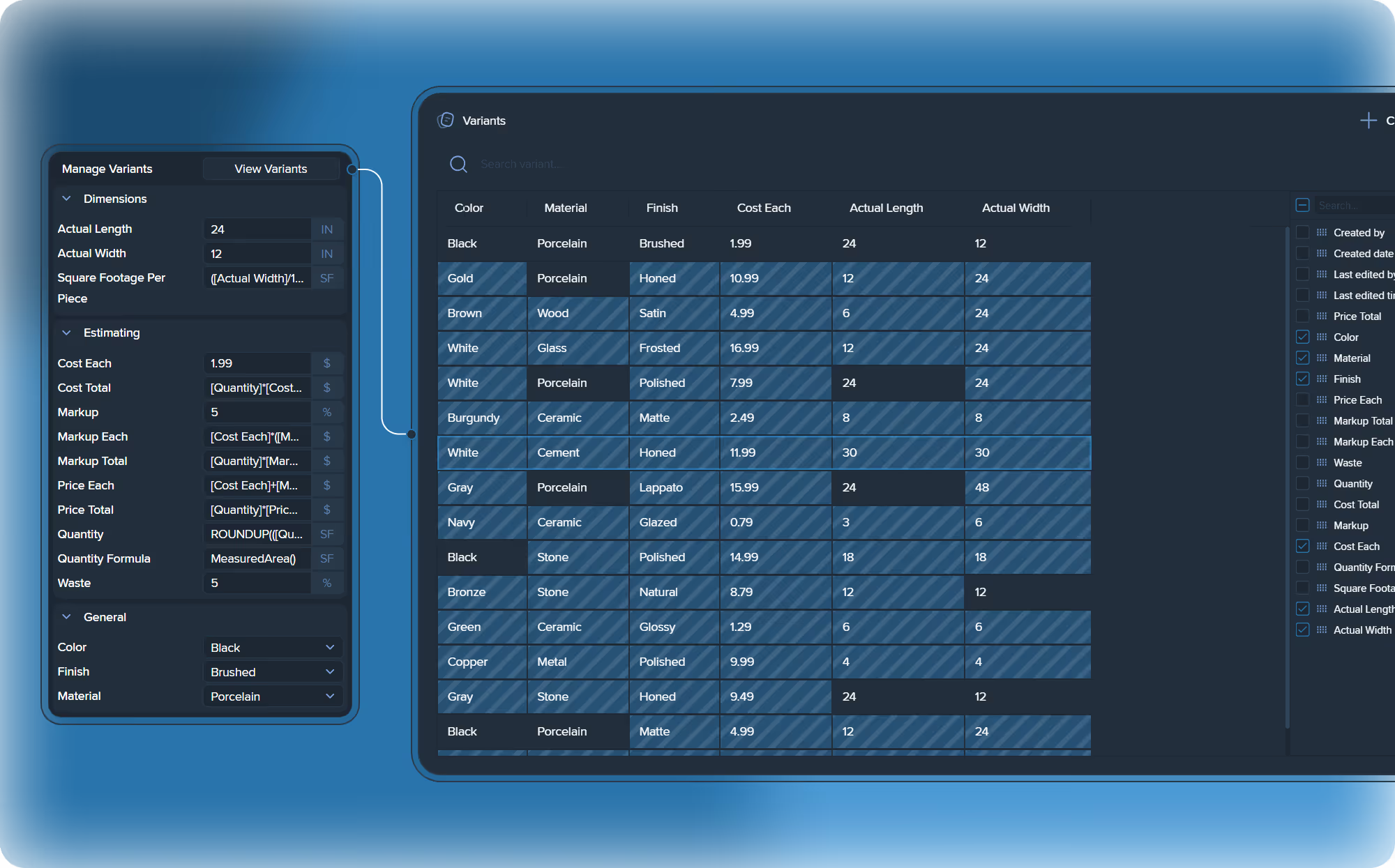
The main innovation of this release is the powerful "Item Variants" feature. Users can now create and manage multiple variations of the same item (e.g., with different materials, finishes, or sizes) directly in the database. This dramatically increases flexibility when creating estimates and managing catalogs.
Let's get to our updates.
Meet "Item Variants"
The Problem: Database Bloat and Costly Errors
For estimators, the item database is a critical asset. But traditional databases, where every single product variation (SKU) needs its own entry, are a major source of risk.
A "Tile 12"x12", White, Matte" and a "Tile 12"x12", White, Glossy" become two separate items. This "database bloat" makes finding the right item difficult and increases the chance of costly errors, like applying the wrong price to the right item. Updating prices is a nightmare: if "White Tile" costs 5% more, you must manually find and change every white tile entry, risking inconsistencies that cost you margin.
The Solution: One Item, Infinite Configurations
Kreo's "Variants" feature solves this problem. It allows you to take one base Item (a high-level concept like "Interior Door" or "Tile") and define its changeable Properties (like Size, Material, or Fire Rating). The Values are the specific options for each property ("12"x12"", "Porcelain", "FD30").
A Variant is simply the unique combination of these values.
Instead of 500 different door items, you have one "Door" item. When you use it, you simply select the properties you need from the side panel. The system instantly finds the correct variant and, most importantly, applies the correct, pre-configured rate data.
Changing "Ceramic" to "Porcelain" doesn't just change the name—it automatically pulls the correct material price and labor norms.
See it in Action: The "Tile" Example
Instead of creating hundreds of individual items for tiles, you create one Master Item: "Floor and Wall Tile". You then define its properties based on real specifications:
Material:"Ceramic", "Porcelain", "Natural Stone"Size (in):"12x12", "24x24", "12x24"Thickness:"~3/8" (Wall)", "1/2" (Floor)"DCOF Rating:"≥ 0.42 (Dry)", "≥ 0.50 (Wet)"Installation Standard:"Standard Mortar", "Epoxy"
When an estimator drags the "Tile" item onto a drawing, they don't search a list. They configure these options in the side panel. The system instantly pulls the correct rate for a "Porcelain, 24x24, 1/2", Epoxy" tile. The risk of a mismatch is eliminated.
Visualizing the "Tile" Variant Matrix
See how just 5 properties create hundreds of potential variants from a single master item. This is the power of scalability.
Theoretical number of variants: 4 x 4 x 2 x 3 x 3 = 288 unique SKUs, managed from one item.
Your New Workflow: Simple, Accurate, and Fast
"Variants" transforms your workflow by providing three key benefits:
- Radical Simplification: Instead of 500 "Door" items, you have 1 "Door" master item. When a price changes (like for "Solid Core"), you change it in one place, and it instantly updates across all 50 variants. This is a true "single source of truth."
- Eliminates Costly Errors: "Variants" act as guardrails. You cannot accidentally select an "FD30 Door" with the price of an "FD60 Door," because the price is a result of the
Fire Ratingproperty. This is built-in quality assurance. - Incredible Speed: New and senior estimators alike no longer hunt through endless lists. You simply configure the item using logical property fields in the side panel. Your database can scale to millions of combinations while remaining fast and clean.
You can find detailed instructions on how to create items for variants in the following guide: What are item variants and how to create them.
Items and Assemblies API
For those who want to take data integration to the next level, we are excited to announce the beta launch of the Items and Assemblies DB API (PIA DB API V1).
The file you provided is the Swagger documentation for our new API. It gives you programmatic access to manage your catalogs. Based on the documentation, the V1 API allows you to:
- Manage Properties: Get, create, update, and delete custom properties in your database (
GET,POST,PUT,DELETE /api/piadb/v1/properties). - Manage Items: Full CRUD (Create, Read, Update, Delete) access to your items, including folder management and duplication (
.../items,.../items/folders,.../items/{itemId}/duplicate). - Manage Assemblies: Similar capabilities for creating and editing assemblies and their structures (
.../assemblies,.../assemblies/folders). - Manage Variants: The new "Item Variants" feature is also fully supported in the API, allowing you to programmatically manage item variations (
.../items/{itemId}/variants,.../variants).
This opens up huge possibilities for integrating Kreo with your internal systems, ERP, or other tools.
Important Information:
- This is the first version of the API (V1) and it is in beta testing.
- At this stage, we are providing access to the API for free.
- If you are interested in getting access and documentation, please contact us, and we will help you get started.
Improvements
We haven't just added big new features; we've also improved the day-to-day usability of the database. Here are the key improvements:
- Custom Columns: Now, for Properties, Items, and Assemblies, you can display your custom properties as separate columns right in the main list. This gives you a complete overview of your catalog, and you no longer need to "drill down" into each item to see the data you need.
- Search in the Properties Panel: We heard your feedback and added search. Now, when you're working with an item that has many properties, you can instantly find the one you need just by typing. No more scrolling through endless lists!
- Stability and Bug Fixes: We've also fixed numerous minor bugs and improved overall stability to make your experience even smoother.
This update is our next step towards freeing the industry from the "invisible tax" and manual work in Excel. We want you to spend your time making decisions, not fighting with data.
We look forward to your feedback on the new features. Try out "Item Variants," and if you're ready for deep integration, contact us for API access!
.png)

.png)


